Make your Minecraft PvP experience cleaner with Tiny PVP Swords and Tools by GamerPotion. This lightweight resource pack reduces the on-screen size of swords and essential tools, giving you a less obstructed view while fighting. Designed for Minecraft Java Edition, it uses a familiar 16× pixel style and is listed for versions ranging from 1.16 to 26.3. Check the available files before downloading to ensure compatibility with your game version.
Official download options are available through Modrinth and CurseForge. CraftMC directs users to these sources instead of hosting its own copy of the ZIP file. All credit for the pack goes to GamerPotion.
About Tiny PVP Swords and Tools
Tiny PVP Swords and Tools is built for players who prefer a simple interface and better visibility during combat. Rather than redesigning terrain, buildings, or creatures, it focuses on the weapons and tools held by the player.
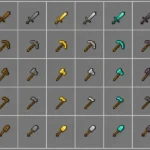
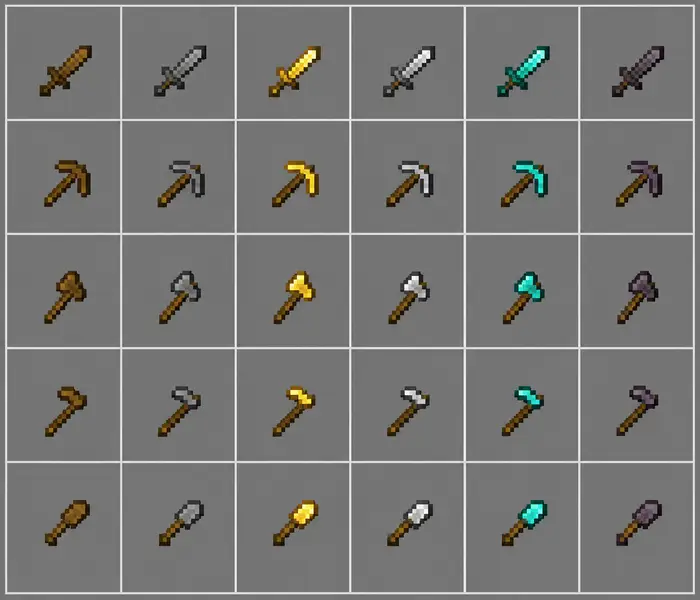
The pack reduces the visual footprint of familiar Minecraft equipment while retaining the recognizable appearance of the vanilla game. Wooden, stone, iron, golden, diamond, and netherite weapons keep their original color schemes, but their compact presentation leaves more of the screen visible.
This can be especially useful during fast-paced matches, where tracking an opponent’s movements and reacting quickly matter. Whether you play Bedwars, duels, or other PvP modes, a smaller first-person weapon can make the action feel less cluttered without requiring a complete texture overhaul.
Why Choose Smaller PvP Swords?
Large first-person weapons can cover part of the screen when you are moving, turning, or approaching another player. A compact sword design reduces that visual obstruction, helping you keep more of the surrounding environment in view.
GamerPotion’s design notes describe very small sword and tool details, with approximate dimensions of 5×5 pixels for swords and 4×4 pixels for tools in Photoshop. The exact appearance may vary by item and resource-pack version.
The pack can be useful for players who want a minimal visual adjustment instead of changing the overall style of Minecraft. Since its purpose is to modify the appearance of weapons and tools, it does not replace the world’s blocks, mobs, or environmental textures.
It is a client-side visual customization rather than an X-ray-style pack. However, individual multiplayer servers can enforce their own resource-pack rules, so check the server’s requirements before using any custom pack.
Main Features of Tiny PVP Swords and Tools
Compact Weapons and Equipment
The resource pack reduces the visual size of swords and common tools, making them less dominant in the first-person view. This is intended to provide a cleaner fighting experience, especially during close-range encounters.
Familiar Vanilla Appearance
The original Minecraft-inspired pixel aesthetic remains intact. Different material tiers retain their recognizable colors and designs, so you can identify your equipment without learning an entirely new texture style.
Support for Multiple Tool Types
The pack includes smaller versions of swords, pickaxes, axes, hoes, and shovels across the supported material tiers. These changes focus on the held item visuals rather than transforming the rest of the game.
PvP-Friendly Crosshair
A compact crosshair is included to complement the pack’s minimalist presentation. It provides an aiming reference while keeping the interface visually simple.
Lightweight Visual Changes
Tiny PVP Swords and Tools targets a limited set of equipment textures or models instead of replacing the complete world. It does not require OptiFine or Iris for its basic functionality, although performance can still depend on your overall Minecraft setup.
Compatibility with Other PvP Packs
You can combine Tiny PVP Swords and Tools with other lightweight resource packs if their files do not conflict. Options such as Low on Fire or a minimalist GUI pack can help create a more streamlined PvP interface.
Pay attention to the resource-pack priority order when combining multiple packs. Minecraft generally gives higher-priority packs control over assets that overlap. Place Tiny PVP Swords and Tools above competing packs when you want its weapon and tool designs to take precedence.
If the crosshair or another texture disappears after combining packs, adjust the order or check whether another pack replaces the same files.
How to Install Tiny PVP Swords and Tools
Follow these steps to enable the pack in Minecraft Java Edition.
- Open the official Modrinth or CurseForge project page and select a download compatible with your Minecraft version.
- Start Minecraft Java Edition and navigate to Options → Resource Packs.
- Click Open Pack Folder to access the resource-pack directory.
- Copy the downloaded ZIP file into the folder without extracting it.
- Return to the game and locate Tiny PVP Swords and Tools in the available packs.
- Move it into the Selected Resource Packs section and adjust its priority if other packs modify the same items.
- Click Done and test the changes in a world or practice match.
If Minecraft displays a compatibility warning, check the pack’s supported versions and file details before proceeding. An older resource pack may work with some newer releases, but compatibility is not guaranteed for every version.
Final Thoughts
Tiny PVP Swords and Tools is a useful option for Minecraft Java players who prefer compact weapons and a less obstructed first-person view. Its limited scope preserves the familiar appearance of the Minecraft world while making selected equipment visually smaller.
For players who spend time in Bedwars, duels, and other combat-focused game modes, this simple design can help create a cleaner screen without the need for a full PvP texture overhaul. Download the pack from its official project page, check version compatibility, and arrange it correctly alongside any other resource packs you use.